


Filing your ITR is an important process of your annual financial management. If self-employed your ITR can provide quite an insight into your income and expenses. Filing ITR gives you certain advantages as well. For example, if you have paid advance taxes throughout the year, you can claim a refund of the excess amount. ITR also serves as proof of income, and so on.
ITR is only processed once you verify it using the verification form, e-verification, or EVC.
What is ITR-V?
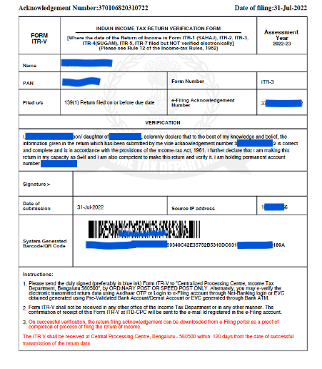
ITR-V is the Income Tax Return Verification form. You will receive ITR-V on your registered e-mail from the Income Tax Department after submitting your ITR. If you do not have an email ID, you can download the form from the e-filing portal of the income tax department.
The Income Tax department uses the ITR-V submission to verify the authenticity of the income tax return and that the ITR is ready to be processed.
You will need to sign the form in blue ink and send it to the following address for offline verification of your ITR:
- Address: Income Tax Department – CPC, Post Box No.1, Electronic City Post Office, Bangalore-560500, Karnataka.
- Acknowledgement: You should submit your ITR after verifying all the details and ensuring their accuracy. Only then generate the ITR-V and sign the document for ITR-V acknowledgement.
- Print the form only in clear black ink
- When mailing the signed ITR-V, make sure to send only the original signed form with the signature in blue ink
- Do not fold, staple the form or disturb the bar code on the form
- ITR-V acknowledgement should be submitted within 120 days of filing your ITR
How to Download ITR Acknowledgement?
When you file your ITR, the e-filing portal automatically generates an ITR-V acknowledgement form and sends it to your registered e-mail ID. If you do not receive the acknowledgement form, you can log on to the e-filing website and download the form using the steps below:
- Log in to the https://eportal.incometax.gov.in/iec/foservices/#/login
- Go to e-file > Income Tax Return > e-Verify Return
- The portal should show you the pending Acknowledgement Forms. If not, search for the appropriate form with the Acknowledgement number
- Select a method of verification for the ITR
- Download ITR-V option will be available if you choose the offline mode
E-Verification of ITR Through EVC
E-verification of ITR is a convenient and faster way of authenticating and sending your ITR for processing. You will need to generate EVC (electronic verification certificate) through any of the following ways:
- EVC through e-mail ID and mobile number
- EVC through Aadhaar number
- EVC through net-banking
- EVC through ATM
- EVC through Demat account
- EVC through bank account details
Once you verify your ITR with EVC, you do not need to send a physical copy of ITR-V to the CPC office. Your ITR will immediately be accepted for processing.
ITR Acknowledgement Necessary for Refunds
Acknowledging your ITR means you have authenticated the information on it and the income tax department can start processing it. If you have paid excess taxes for the previous year acknowledging your ITR will bring you closer to the refund.
Also, the Acknowledgement form is valid only for 120 days. So, verifying your ITR quickly after filing is important. It will ensure that you don’t pay a penalty for late filing of your ITR.